August 31, 2026

Choosing between Microsoft 365 and Google Workspace is not really about picking a winner. Both platforms run millions of companies well, including plenty right here in Melbourne. The real question is which one fits how your staff actually work day-to-day, what your industry expects of you, and where your operation is headed over the next few years.
We support both platforms for our clients, so the advice below is not weighted toward either one. What follows is a straightforward look at where each platform is strongest, where the two genuinely differ, and how to work out which is the better fit for your setup.
Microsoft 365 is built around the desktop versions of Word, Excel, Outlook, and PowerPoint, with cloud storage and Teams layered on top. If your staff already work in these applications, or exchange files regularly with larger organisations that do, Microsoft 365 tends to feel like a continuation of how your business already operates rather than a change to it.
The clearest advantage shows up in security and compliance. Business Premium plans bundle device management, data loss prevention, and identity protection that would otherwise mean piecing together separate tools from separate vendors. For companies in legal, financial services, or any field handling sensitive client records, that built-in depth often matters more than the monthly cost.
Our Microsoft 365 Consultant service covers setup, licensing, and ongoing management, so your organisation lands on the right tier for how it actually operates, and stays properly supported after go-live, rather than whatever plan was recommended when the account was first set up.
Google Workspace takes a different approach. Gmail, Docs, Sheets, and Meet all run in the browser, which means less time spent on installation and updates, and a shorter learning curve for new starters. Many staff arrive already familiar with the interface from personal use, so onboarding tends to move faster.
Real-time collaboration is where Google Workspace has always held an edge. Several people can work inside the same document at once with very little friction, which suits companies that lean heavily on shared docs, spreadsheets, and short video calls rather than long email threads. For lean teams that want to spend less time managing accounts and permissions, that simplicity carries real weight.
Our Google Workspace Setup Services cover migration, configuration, and ongoing management, so switching over or setting up fresh does not mean untangling the technical details alone.
Once the marketing is set aside, a few practical differences stand out for Melbourne companies weighing up either platform.
None of these differences make one platform objectively better. They point toward different kinds of operations.
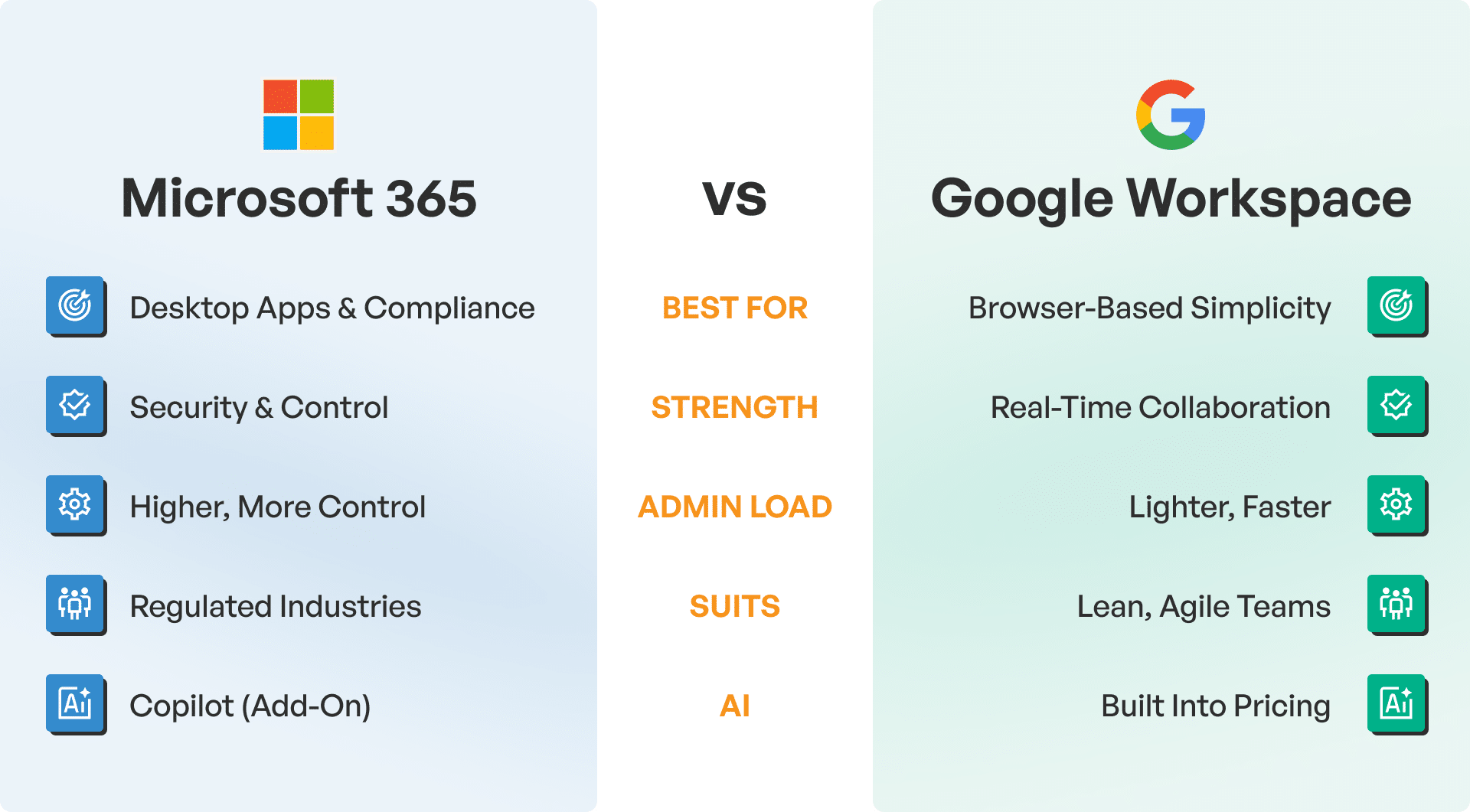
A few honest questions usually settle it. Does your organisation handle sensitive client data that needs strong compliance controls, or are staff mostly moving documents and ideas around a small team? Are your people already fluent in Microsoft’s tools, or would a simpler, browser-based platform suit how they work now? Are you planning to grow quickly, and if so, does the platform’s administrative load match the size you are heading toward?
If the answer still is not obvious after asking these questions, that is common. Plenty of companies sit somewhere in the middle, and the right call often depends on details specific to the operation that a general comparison cannot capture on its own.
We help Melbourne businesses set up, migrate, and manage both Microsoft 365 and Google Workspace, so our recommendation is based on your setup rather than a preference for one vendor. If you would like a straightforward conversation about which platform fits your organisation, get in touch with The Owl IT Services, and we will walk you through it.
Yes. Migrations between Microsoft 365 and Google Workspace are common. They can be complex, but with proper planning, emails, files and calendars transfer across without loss. Our team handles Google Workspace migration and Microsoft 365 migration from start to finish. If you are moving away from Google, our step-by-step guide to migrating from Google Workspace to Microsoft 365 walks through each stage. The process takes longer for larger teams with more historical data, so it is worth scheduling around a quieter period for the business.
At entry-level plans, the cost difference between the two is minor. The bigger factor is usually what is needed beyond the basics, such as advanced security or larger storage allowances, and that can shift the balance either way depending on the plan chosen. For a breakdown of the Microsoft side, see Office 365 pricing explained.
We would recommend against it. Running both platforms at once tends to create more problems than it solves, from duplicated files and calendars to staff losing track of which system holds the current version of something. Most companies get better value from committing to one platform and configuring it properly, rather than running two systems in parallel.
Organisations handling sensitive client data generally lean toward Microsoft 365, given its built-in security and compliance tooling. Google Workspace can be configured with strong protections too, so the right choice still depends on the specific obligations the organisation needs to meet.
Both platforms connect to a wide range of accounting, CRM, and project management tools, though the depth of that integration varies by software. Microsoft 365 tends to integrate more tightly with other Microsoft products and legacy Windows-based systems, while Google Workspace favours cloud-native tools built with open APIs. It is worth checking your specific software against both before deciding.